Digital & electronics26/10 Week 2
Wireless Mice to Carry in Your Bag TOP5 picks
A portable mouse needs to balance how much space it takes up in your bag with the controls you need at your desk. Switching between two computers, using surface gestures on a Mac, or working with a wheel that also suits gaming: the features you use most should guide your choice.
Information checked
The five at a glance
Compare at a glance ↓- 01
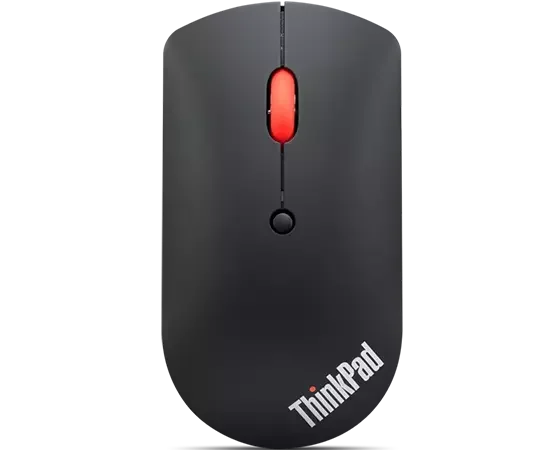 LenovoThinkPad Bluetooth Silent Mouse
A low-profile body for switching between two computers
View product ↓ - 02
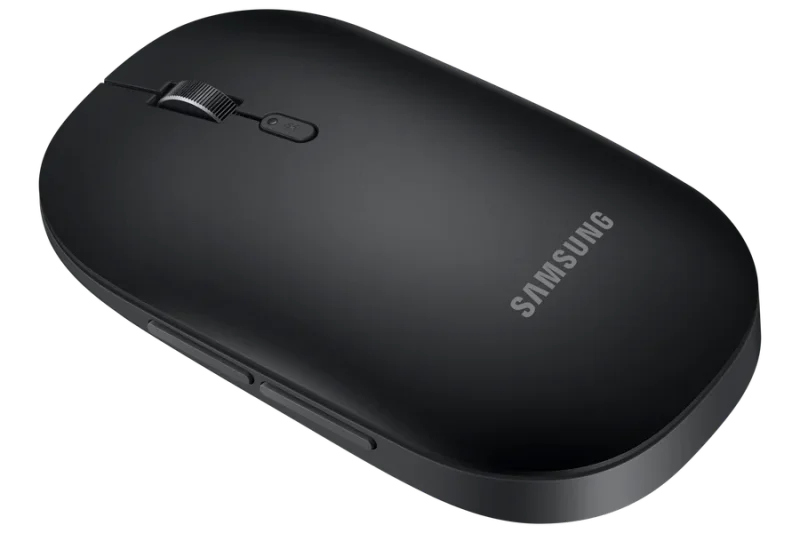 Samsung ElectronicsSlim Bluetooth Mouse
A slim fit for traveling with one laptop
View product ↓ - 03
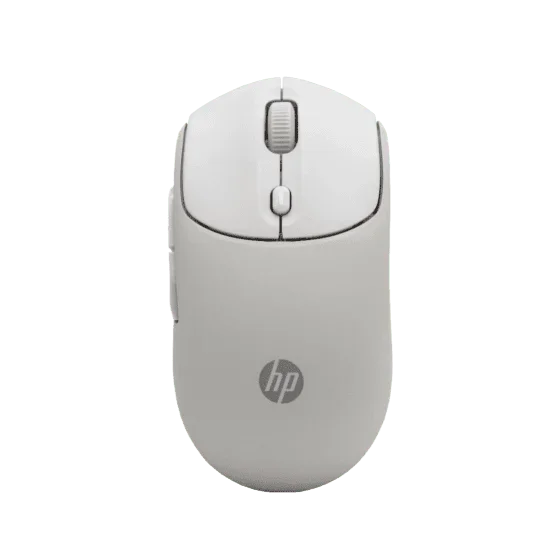 HPHP 400 Quiet Wireless Mouse
A choice between Bluetooth and a USB receiver
View product ↓ - 04
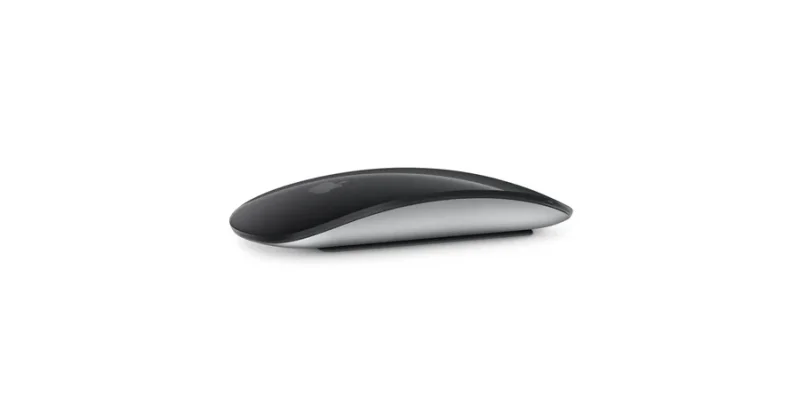 AppleMagic Mouse (USB-C)
Surface gestures that carry over to your Mac mouse
View product ↓ - 05
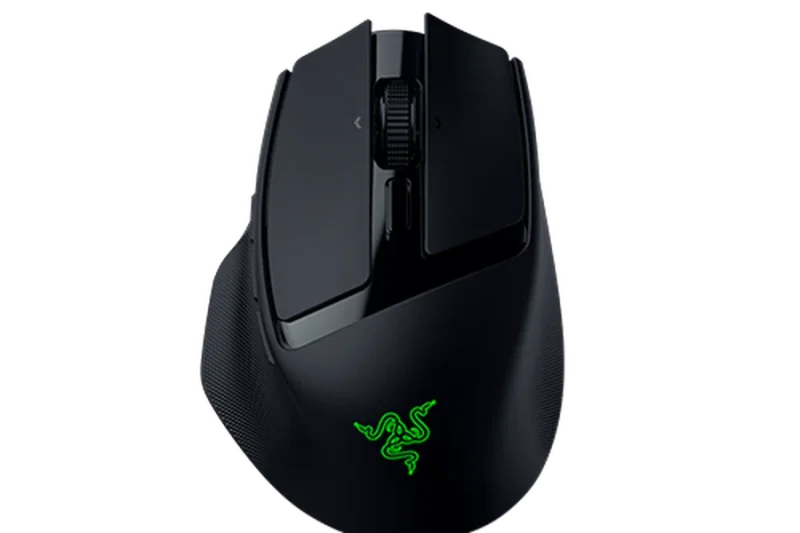 RazerRazer Basilisk Mobile
A wheel with scrolling modes for different tasks
View product ↓
If your mouse makes one side of your bag bulge, a low-profile body is a natural starting point. But thickness alone is not enough when you also need to connect to another computer or read long documents once you arrive. It helps to consider how much space the mouse takes up, how it connects to your computers, and whether it lets you keep using the controls you are familiar with.
Why consider it now
If you switch between a work laptop and a personal computer, or pack a bag to work elsewhere, it helps to consider both storage space and connectivity. Choosing a connection method also makes it clear which receiver or cable you need to bring. If you use the same laptop for documents and games, or frequently use Mac gestures, the controls matter as much as the size.
Why this order
ThinkPad is the first choice when a low-profile body and device switching are the priorities. It is slightly thicker than Samsung, but being able to switch between two computers with a button gives it the edge here. Samsung takes the lead if you travel with one laptop and want the flattest fit, while HP moves ahead if you also need a USB receiver connection. Magic Mouse is better suited to Mac gestures, and Razer to gaming and more varied wheel controls. This order reflects recommendations for different uses, not sales performance.
Lenovo
ThinkPad Bluetooth Silent Mouse
Our first pick
A low-profile body for switching between two computers
It takes the first recommendation because it combines a low-profile body with button-operated switching between two devices. Although slightly thicker than Samsung, the convenience of changing connections may matter more if you alternate between work and personal computers. Sensitivity can also be set to 800·1600·2400DPI, offering more choice than Samsung’s 1000DPI specification. If you stay connected to one computer and focus on reducing storage thickness, Samsung comes first.
Suited to people who alternate between two Windows computers for work and personal use and carry a low-profile mouse in their bag every day.
How thinly a mouse fits in your bag matters, but so does which computer you will connect it to when you arrive. ThinkPad uses Bluetooth 5.0 to pair with up to two devices in advance and lets you switch between them with a button. This reduces the need to set up a new connection each time you move from a work laptop to a personal computer. It suits alternating between two Bluetooth devices rather than connecting through a USB receiver.
The body is 29mm high and 58mm wide, making it taller than Samsung at 26.05mm but lower than HP at 40mm. It balances storage space with device switching rather than offering the flattest possible shape. It has a symmetrical body, quiet buttons, and power from a single AA battery. Official support covers Windows 10 and 11, making its appeal clear for moving between work computers running these systems.
Choose between two paired devices with a button
Pair two computers in advance and use the button to switch the connection. This is useful when you want to keep using one mouse across Windows computers at work and at home.
Three sensitivity settings to suit your hand movements
DPI determines how far the pointer moves for a given hand movement. The mouse offers 800·1600·2400DPI, letting you adjust sensitivity to the movement you prefer.
Before you choose
Official support covers Windows 10 and 11. Magic Mouse is a better fit for Mac gestures, while HP is better suited to those who also need a USB receiver connection.
- Model
- 4Y50X88822
- Body dimensions
- Width 58mm · height 29mm
- Connection / switching
- Bluetooth 5.0 · pairing with up to two devices and button switching
- Sensitivity
- 800 / 1600 / 2400DPI
- Power
- 1 AA battery
- Officially supported OS
- Windows 10 / Windows 11
Samsung Electronics
Slim Bluetooth Mouse
Why consider it
A slim fit for traveling with one laptop
The second recommendation is for those who value slim storage more than device switching. At 26.05mm thick, it is lower than ThinkPad at 29mm and HP at 40mm, helping reduce the bulge in a pouch. ThinkPad has the stronger advantage if you want to switch between two devices with a button and adjust sensitivity. Samsung can be your first choice if you use one laptop and a flat fit is the top priority.
Suited to people who travel with one Windows laptop and want to carry their mouse alongside it in a slim pouch.
If you always travel with the same laptop, the space a mouse takes up in your bag may matter more than switching connections. Samsung’s slim Bluetooth mouse measures 62.26 × 106.81 × 26.05mm, making it flatter but slightly wider than ThinkPad. Thickness matters when you want less bulk in a pouch, while width and length determine how much space it needs at the bottom.
It connects through Bluetooth 5.0, so there is no need to use a USB port for a receiver. It has five buttons, 1000DPI sensitivity, and power from a single AA alkaline battery. The official system requirements list Android 4.1 and Windows 7 or later. It suits people who browse webpages and work on documents on one laptop and prefer replacing a battery to using a charging cable.
Less bulk in a pouch
At 26.05mm thick, the body fits flatter than ThinkPad or HP. This helps reduce the height the mouse takes up in a laptop bag already holding an adapter and other belongings.
Bluetooth connectivity and replaceable battery power
Bluetooth 5.0 and an AA battery mean there is no need to plug in a receiver or connect a charging cable to the mouse. Bluetooth handles the connection, while battery replacement handles power.
Before you choose
Power is managed by replacing a single AA alkaline battery. Magic Mouse or Razer are alternatives if you prefer charging with a USB-C cable.
- Model / color
- EJ-M3400DBEGKR · Black
- Dimensions
- 62.26 × 106.81 × 26.05mm
- Connection
- Bluetooth 5.0
- Buttons / sensitivity
- 5 buttons · 1000DPI
- Power
- 1 AA alkaline battery
- Officially supported OS
- Android 4.1 · Windows 7 or later
HP
HP 400 Quiet Wireless Mouse
Why consider it
A choice between Bluetooth and a USB receiver
HP is the third choice when balancing height for carrying with connection options. Its body is taller than the first two products, but the included USB-A receiver becomes more valuable at a desk where you need that connection. Horizontal scrolling is also an advantage for wide documents. Samsung comes ahead for flatter storage, while HP takes priority when different desks call for different connection methods.
Suited to people who use both a Bluetooth laptop and a computer with a USB-A port, and frequently scroll horizontally through documents.
Moving between two computers does not always call for the same connection features. If you want Bluetooth on your laptop and a USB receiver at another desk, HP 400’s Bluetooth 5.2 and 2.4GHz wireless connections are useful. A USB-A receiver is included. Unlike ThinkPad’s switching between two Bluetooth devices, its advantage is the ability to choose the connection method for each computer.
Vertical and horizontal scrolling also give it a reason to be considered if you read wide documents. You can move from scrolling down a page to exploring content that extends sideways. Its ambidextrous body uses silicone rubber and offers quiet clicks, with power from a single AA battery. At 118 × 61 × 40mm, it stands taller than Samsung or ThinkPad and needs more storage space. It suits those who value both connection options and document navigation.
Connection options for different desks
Connect to a laptop through Bluetooth 5.2 or use the included receiver with a computer that has a USB-A port. The advantage is being able to choose whichever connection method you need.
Navigate documents vertically and horizontally
Vertical and horizontal scrolling let you both read down a page and explore content spread across it. How often you move in each direction through documents helps determine the value of this feature.
Before you choose
The 40mm-high body needs deeper storage space than Samsung or ThinkPad. A computer needs a USB-A port to use the receiver.
- Product number / color
- AZ7B6AA · Maple
- Body dimensions
- 118 × 61 × 40mm
- Connection
- Bluetooth 5.2 / 2.4GHz wireless
- Receiver
- USB-A receiver included
- Design
- Ambidextrous · silicone rubber material · quiet clicks
- Power
- 1 AA battery
- Scrolling
- Supports vertical and horizontal scrolling
Apple
Magic Mouse (USB-C)
Why consider it
Surface gestures that carry over to your Mac mouse
It is the thinnest by body height, but ranks fourth when compatibility and charging are also considered. Its official requirements center on Mac and iPad, and it cannot be used while charging. Magic Mouse moves up the list if Mac page swipes matter more than HP’s receiver connection. It can also be a suitable first choice if your main tasks are reading documents and moving between webpages on a MacBook.
Suited to people who want to use finger gestures to move between webpages and scroll through documents on a MacBook running macOS 15.1 or later.
The surface controls matter if you want to keep using familiar MacBook finger gestures on a mouse. Magic Mouse’s Multi-Touch surface lets you swipe between webpages and scroll through documents. Its controls center on a different approach from Razer’s physical wheel and buttons. It makes sense if you want surface gestures for moving between pages and reading documents on a Mac.
At 21.6mm high, it has the lowest body of the five products, with a length of 113.5mm and a width of 57.1mm. It connects through Bluetooth, and the included USB-C cable can be plugged into a Mac for pairing and charging. Unlike the first three products, it does not need AA battery replacements, but it cannot be used while charging. The official requirements are a Mac running macOS 15.1 or later or an iPad running iPadOS 18.1 or later, so device compatibility and time to charge matter alongside the low-profile body.
Swipe through pages with your fingers
The Multi-Touch surface supports page swipes and document scrolling. If you frequently use finger gestures on a Mac, navigating through the surface is a reason to choose it.
A low-profile fit with cable charging
The 21.6mm-high body fits into a slim space and uses charging rather than replacement AA batteries for power. Connect the included USB-C cable to a Mac for pairing and charging.
Before you choose
The mouse cannot be used while charging, so it needs to be charged during downtime. Your device must also meet the official requirement of macOS 15.1 or later or iPadOS 18.1 or later.
- Model
- A3204 · USB-C model
- Body dimensions
- Length 113.5 × width 57.1 × height 21.6mm
- Wireless connection
- Bluetooth
- Controls
- Multi-Touch surface · page swipes and document scrolling
- Charging
- USB-C · charging cable included · cannot be used while charging
- Officially supported OS
- macOS 15.1 or later / iPadOS 18.1 or later
Razer
Razer Basilisk Mobile
Why consider it
A wheel with scrolling modes for different tasks
Razer combines controls for work and gaming, but is the fifth choice when slim storage comes first. It is wider and bulkier than Samsung and ThinkPad, but compared with HP’s vertical and horizontal scrolling, it also lets you choose how the wheel rotates. Razer is better suited to those who want a physical wheel and wireless connectivity for gaming rather than Magic Mouse’s surface gestures. It can move up your list if you use your right hand and have room in your bag.
Suited to people who use one laptop for both documents and games and want a right-handed shape with varied wheel controls.
If you read documents away from home and return to play games on the same laptop, the wheel controls can help determine which mouse to carry. Razer’s 4-way HyperScroll tilt wheel offers a notched tactile mode and a freely rotating free-spin mode. You can change the way the wheel turns depending on whether you want distinct steps or quick scrolling through long content.
It supports three connection methods: HyperSpeed Wireless, Bluetooth, and wired. A USB wireless dongle compartment on the underside saves you from finding a separate place to pack the dongle. It weighs 76g excluding the dongle and cable and is 111.5mm long. However, at 75.9mm wide and 41.4mm high, it needs more storage space than flatter office mice, and the body is designed for right-handed use. It charges with the included USB-A to USB-C cable.
Switch between notched and free-spinning scrolling
The 4-way wheel’s tactile mode provides distinct scrolling steps, while free-spin mode lets you move quickly through long content. You can choose the way the wheel rotates to suit what you are working with.
Connection options with onboard dongle storage
The USB wireless dongle fits in the compartment on the underside, making it easy to carry with the mouse. Once you arrive, you can choose between Bluetooth, HyperSpeed Wireless, and a wired connection.
Before you choose
The right-handed body is 75.9mm wide and 41.4mm high, making it a less suitable first choice for a thin, narrow pouch or left-handed use. Its short length alone does not determine how well it fits; the width and height of the available space also matter.
- Model
- RZ01-04310100-R3A1
- Body dimensions
- Length 111.5 × width 75.9 × height 41.4mm
- Weight
- 76g · excluding dongle and cable
- Connection
- HyperSpeed Wireless / Bluetooth / wired
- Design / wheel
- Right-handed · 4-way HyperScroll tilt wheel
- Portability / charging
- Dongle compartment on the underside · USB-C charging
MAKE YOUR CHOICE
Compare at a glance
29mm
Bluetooth 5.0 · switching between two devices
Quiet clicks · 3 DPI settings
1 AA battery
26.05mm
Bluetooth 5.0
5 buttons · 1000DPI
1 AA alkaline battery
40mm
Bluetooth 5.2 / 2.4GHz · USB-A receiver included
Quiet clicks · vertical and horizontal scrolling
1 AA battery
21.6mm
Bluetooth
Multi-Touch · page swipes
USB-C charging · cannot be used while charging
41.4mm
HyperSpeed Wireless / Bluetooth / wired
4-way wheel · tactile/free-spin
USB-C charging
Selection criteria
These recommendations prioritize low-profile bodies that are easy to carry while retaining useful work features. Your operating system and preferred controls may change which product comes first. This is not a ranking of sales or popularity.
- Editorial period
- 26/10 Week 2
- Information checked
- 2026-10-07