Digital & electronics26/11 Week 1
USB-C Multiport Hubs: Start with the Devices You Connect TOP5 picks
When connecting a monitor and peripherals to a laptop, the types of ports you gain matter more than the total count. We compare multiport hubs priced from around KRW 30,000 to under KRW 40,000 by USB speed, card readers, and Ethernet connectivity.
Information checked
The five at a glance
Compare at a glance ↓- 01
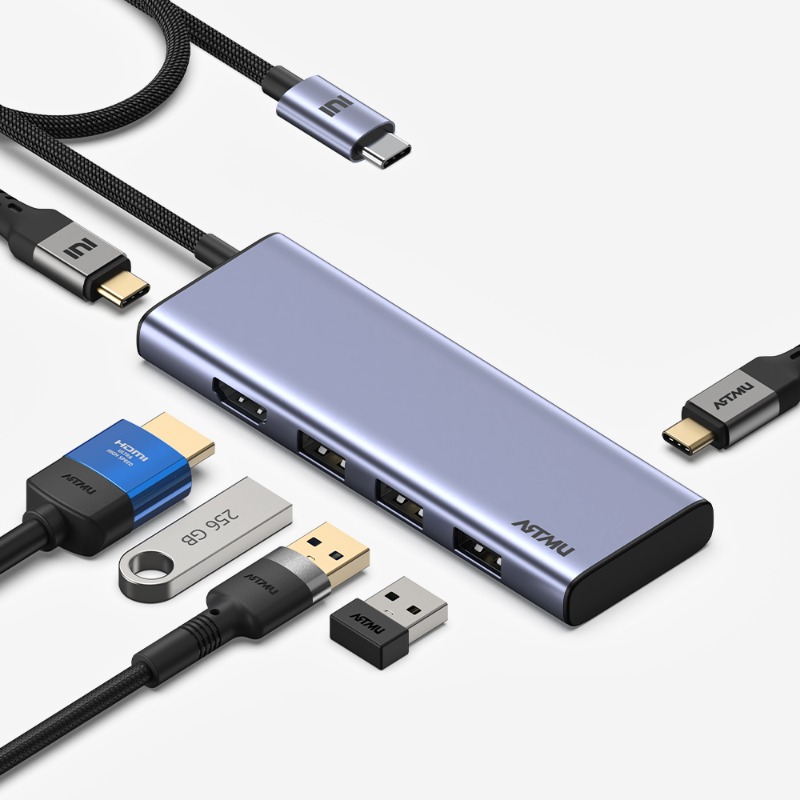 ArtmuArtmu MH320
A practical way to add 4 USB ports
View product ↓ - 02
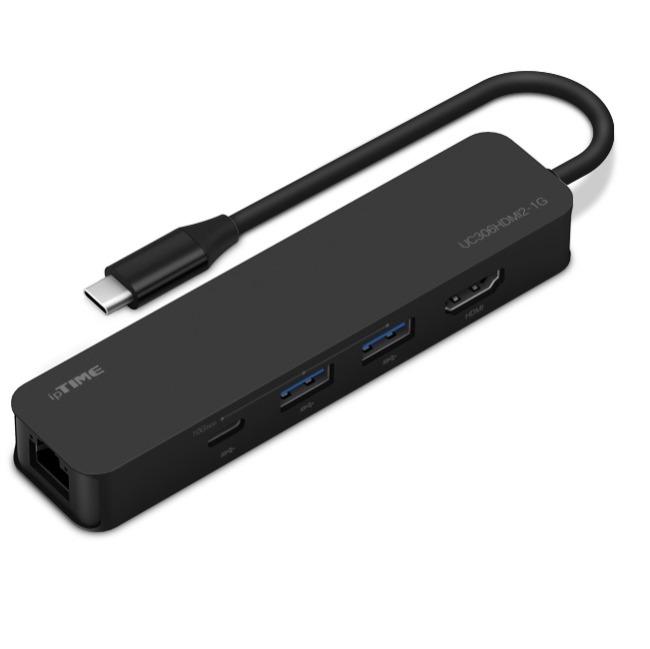 ipTIMEipTIME UC306HDMI2-1G
Ethernet and fast USB together
View product ↓ - 03
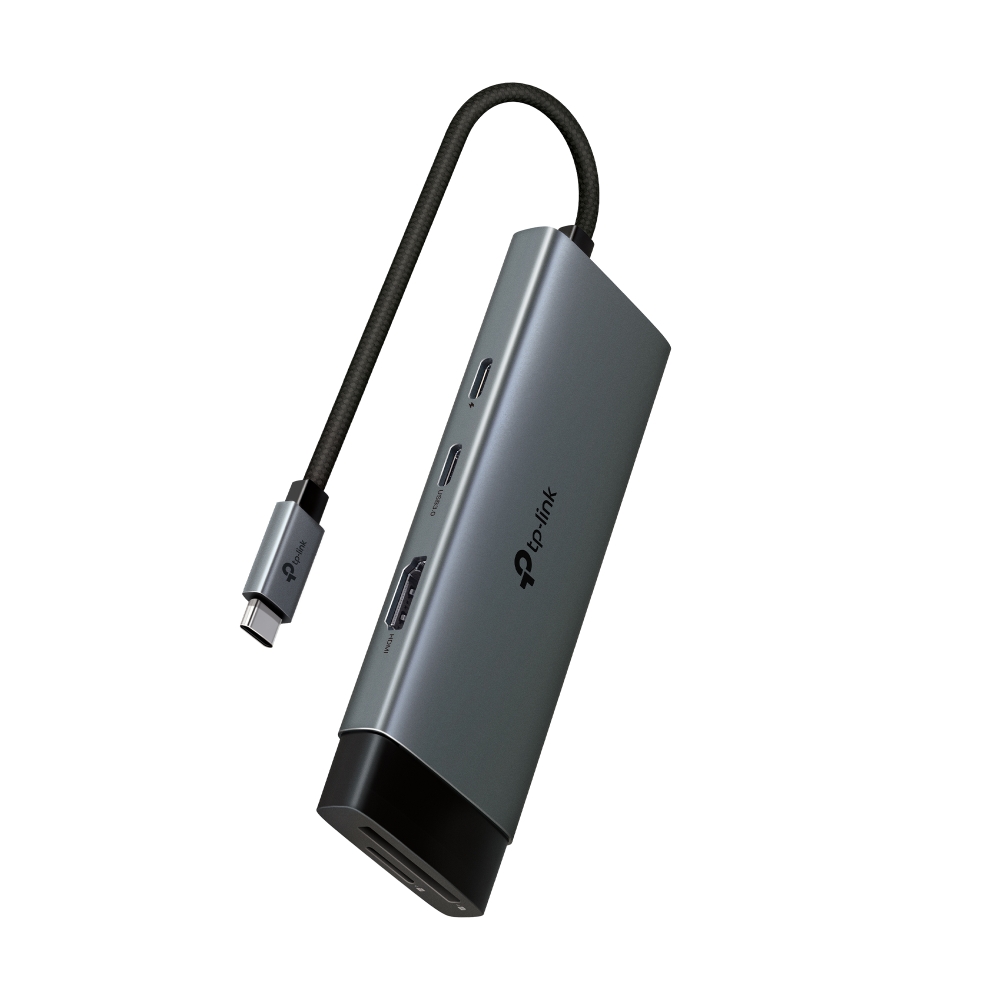 TP-LinkTP-Link UH7020C
2 card slots for photo work
View product ↓ - 04
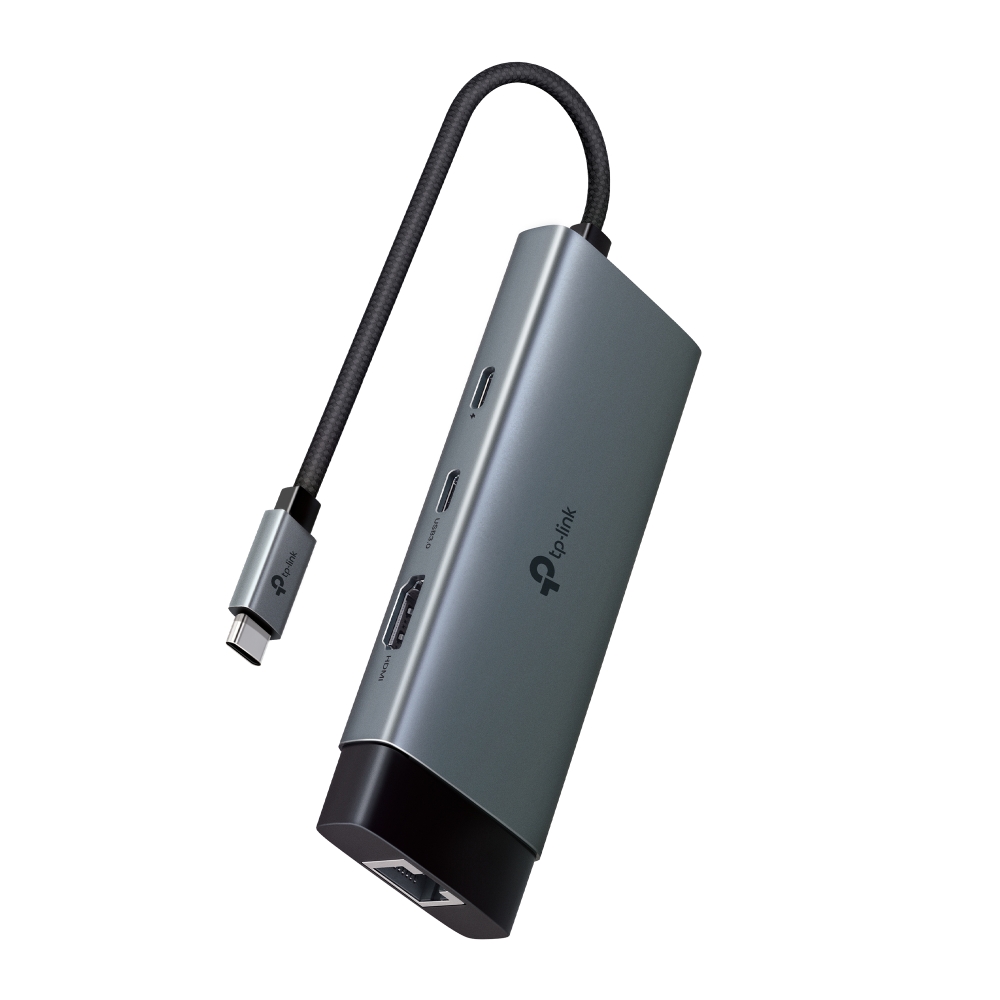 TP-LinkTP-Link UH6120C
Wired connectivity with connector storage
View product ↓ - 05
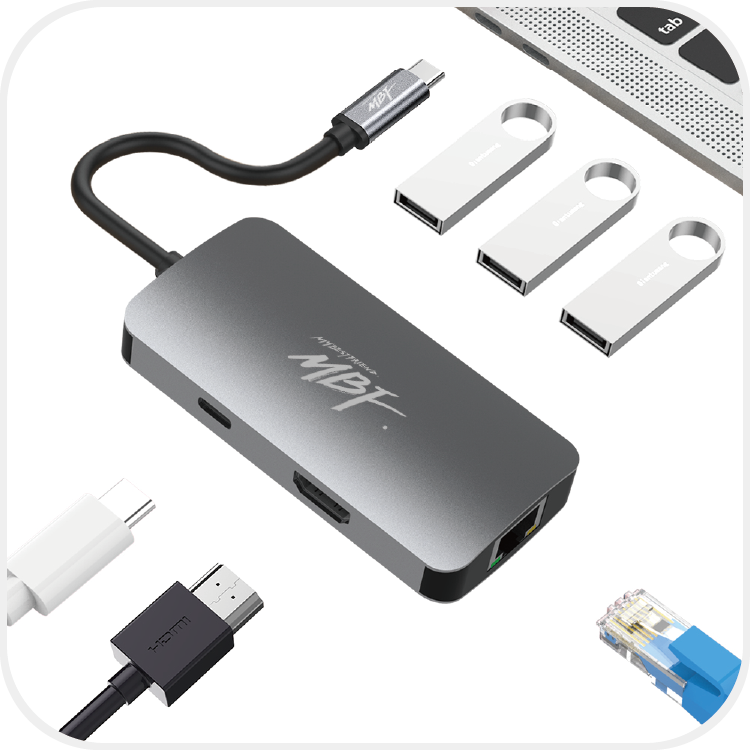 MBFMBF MBF-UC6IN1 (MB1383)
Connect 3 USB-A devices and an Ethernet cable
View product ↓
A keyboard, mouse, and external storage device can quickly use up a laptop’s USB ports. If you also want an external monitor, a multiport hub with HDMI is more convenient than a hub that only adds USB ports. Yet even among 6-port models, one may provide an extra USB port while another uses that space for Ethernet. Start by considering whether you frequently read camera memory cards, connect an Ethernet cable at your desk, or want to take advantage of an external SSD’s transfer specification. Also check whether your laptop’s USB-C port supports video output and charging. A matching connector shape does not guarantee that every function will work.
Why consider it now
When using an external monitor and existing USB-A peripherals alongside USB-C storage, it helps to distinguish the role of each port. Even within a similar budget, you can choose whether to prioritize faster data ports, a card reader, or Ethernet.
Why this order
We prioritize configurations that connect multiple USB peripherals while keeping costs down. The MH320 provides 4 data ports for KRW 29,700, so we recommend it ahead of the ipTIME at KRW 36,600. At a desk that requires Ethernet, however, the ipTIME has the advantage and also supports a data specification of up to 10Gbps with a Gen2-compatible host and peripherals. The UH7020C suits direct memory-card access, while the UH6120C suits Ethernet use on the move with a connector that stows in the hub. The MBF focuses on combining Ethernet with 3 USB-A ports.
Artmu
Artmu MH320
Our first pick
A practical way to add 4 USB ports
We prioritize its 4 data ports at KRW 29,700. Unlike the second-ranked ipTIME, it has no Ethernet port, but its extra USB-A port benefits wireless-network setups with many peripherals. If Ethernet is essential, choosing the ipTIME first makes more sense. If you frequently insert memory cards directly, the UH7020C is a better fit.
Suitable for laptop users who want to combine USB-A input devices with USB-C storage while keeping the hub’s purchase cost down.
The MH320 suits desks with several USB-A devices, such as a keyboard and mouse. It has 3 USB-A data ports and 1 USB-C data port; 1 of the USB-A ports uses the 480Mbps specification. You can connect an input device to that port and assign storage devices to the other 2 USB-A ports and 1 USB-C port, which support up to 10Gbps. Actual transfer speeds depend on the specifications supported by the laptop and storage devices.
Display connectivity requires a device that supports USB-C DP Alt Mode. Output at up to 4K 60Hz requires DisplayPort 1.4 support on the laptop and HDMI 2.0 support on the display; a DP 1.2 laptop is limited to 4K 30Hz. The PD port provides pass-through power with up to 100W input, so you need a separate PD power source and must check that the laptop supports charging. The hub’s maximum input rating should not be interpreted as the charging power always delivered to the laptop.
Separate ports for input devices and storage
Among the 3 USB-A ports, the 480Mbps port is well suited to a keyboard or mouse. The remaining data ports, rated at up to 10Gbps, can be assigned to compatible storage devices.
A hub price that keeps connection costs down
The official store lists the hub at KRW 29,700 with free shipping. If you do not need a separate Ethernet port or card reader, you can focus on basic USB expansion.
Before you choose
There is no Ethernet port or card reader. The 3 USB-A ports do not all run at the same speed, so you need to choose the appropriate port for storage.
- Data ports
- USB-A 10Gbps: 2 · 480Mbps: 1, USB-C 10Gbps: 1; actual speeds depend on connected device specifications
- Video requirements
- DP Alt Mode-compatible device; 4K 60Hz requires DP 1.4 and HDMI 2.0, DP 1.2 is limited to 4K 30Hz
- Power
- PD input up to 100W · Pass-through; requires a separate PD power source and host charging support
- Price when checked
- KRW 29,700 · 1 new hub in Metal Gray · Free shipping2026-11-03
ipTIME
ipTIME UC306HDMI2-1G
Why consider it
Ethernet and fast USB together
Its advantage is adding Ethernet while supporting a data specification of up to 10Gbps with a Gen2-compatible host and peripherals. We place it second because the hub costs KRW 6,900 more than the MH320 and has 1 fewer data port. At a work desk where a wired network is standard, however, it serves the purpose better than our first pick. Its verified price is lower than the UH6120C, which also includes Ethernet, making it worth considering first if transfer specifications and cost are your priorities.
Suitable for people connecting 2 USB-A peripherals and USB-C storage in an office with a wired network.
The UC306HDMI2-1G is a good fit if you want to connect a laptop without an Ethernet port to a wired network while also using external storage. Its 2 USB-A ports and 1 USB-C port support up to 10Gbps, and it includes a separate Gigabit Ethernet port. Taking advantage of that data specification requires a host and peripherals that support USB 3.2 Gen2; actual speeds vary with the setup.
HDMI outputs video at up to 4K 60Hz from a device that supports DP Alt Mode. An HDMI cable is required separately. PD charging likewise requires a PD-compatible device and a separate PD charger, with the manufacturer specifying power delivery of up to 100W. Connecting a power-hungry external hard drive or similar device may require additional power through the PD port.
Connect to a network and storage together
It provides a Gigabit Ethernet port and 3 USB data ports rated at up to 10Gbps. Using the 10Gbps specification requires a Gen2-compatible host and peripherals, while Gigabit Ethernet requires a USB 3.x connection. With USB 2.0, the USB-side speed is limited to 480Mbps.
A separate USB-C port for data
There is 1 USB-C data port in addition to the PD charging port. Charging requires a PD-compatible device and a separate PD charger, while storage connects to the data port.
Before you choose
There is no card reader, and you cannot connect 3 USB-A devices at once. If working with photo memory cards is your main task, the UH7020C’s slots are more convenient.
- Data ports
- USB-A: 2 · USB-C: 1, up to 10Gbps; requires a USB 3.2 Gen2 host and devices
- Ethernet port
- 10/100/1000Mbps; requires a USB 3.x connection, USB 2.0 is limited to 480Mbps
- Video
- Up to 4K 60Hz; requires a DP Alt Mode device, HDMI cable sold separately
- Power
- Up to 100W PD; requires a PD-compatible device and a separate PD charger
- Price when checked
- KRW 36,600 · 1 new hub · Free shipping2026-11-03
TP-Link
TP-Link UH7020C
Why consider it
2 card slots for photo work
It offers more value when memory-card work is part of your routine than when you only need USB ports. Its data-transfer specification is lower than the ipTIME’s, but its SD and microSD slots move it higher in the recommendation order for photo work. If you do not need a card reader, the MH320’s greater number of USB data ports is more practical. If Ethernet is essential, you can choose the UH6120C, which has an Ethernet port instead of card slots.
Suitable for people who read camera SD cards and microSD cards on a laptop while keeping a keyboard and mouse connected.
The UH7020C adds USB ports while letting you read SD and microSD cards directly. If you alternate between camera cards and smaller memory cards, you do not need to reserve a port for a separate card reader. The manufacturer states that it supports simultaneous reading and writing on both cards.
Its 2 USB-A data ports and 1 USB-C data port are rated at up to 5Gbps. HDMI supports a maximum output of 4K 60Hz, while actual output and transfer performance depend on the host device’s supported specifications. PD input is rated at up to 100W, but a charger is not included. Charging a laptop requires a separate PD charger that meets the input specifications, and the PD port cannot transfer data.
Less need to carry a separate card reader
Both SD and microSD slots let you insert cards of different sizes directly into the hub. Simultaneous reading and writing on both cards makes it suitable for frequent card work.
Ports that keep input devices connected
While using the card slots, you can still assign 2 USB-A ports and 1 USB-C port to peripherals. The 3 data ports are rated at up to 5Gbps, with actual transfer speeds depending on connected devices and the setup.
Before you choose
There is no Gigabit Ethernet port. If connecting storage at a specification of up to 10Gbps matters more, the MH320 or ipTIME is a better choice.
- Card slots
- SD · microSD UHS-I, simultaneous reading/writing on both cards
- Data ports
- USB-A: 2 · USB-C: 1, up to 5Gbps; actual speeds depend on devices and setup
- Video
- HDMI up to 4K 60Hz; depends on host video-output specifications
- Power
- PD input rated at up to 100W; requires a separate PD charger that meets the specifications, PD port does not transfer data
- Price when checked
- KRW 33,200 · 1 new hub · Shipping: KRW 3,000 extra2026-11-03
TP-Link
TP-Link UH6120C
Why consider it
Wired connectivity with connector storage
This is a good fit if you value connector storage while adding Ethernet and a USB-C data port. The hub costs KRW 2,600 more than the ipTIME at the same retailer, and its maximum data specification is 5Gbps, so it ranks behind on cost and transfer specifications. If you need a way to stow the connector when traveling, however, there is reason to prioritize this model. Compared with the MBF, it has 1 fewer USB-A port but provides USB-C for data.
Suitable for laptop users who move between locations with wired networks and also use USB-C storage.
The UH6120C provides Gigabit Ethernet, HDMI, a PD input, and 3 USB data ports. Its 2 USB-A ports and 1 USB-C port are rated at up to 5Gbps. It is worth considering when connecting an Ethernet cable and peripherals at your desk matters more than the maximum transfer specification for external storage.
The connector can be stowed in the hub, keeping the cable end tidy when traveling. HDMI is specified at up to 4K 60Hz, with actual output depending on the host device’s supported specifications. PD input is rated at up to 100W, and charging requires a separate PD charger that meets the specifications. Gigabit Ethernet may require driver installation on some older operating systems, including Windows 7/8 and Mac OS X 10.9~10.15.
Keep the connector tidy on the move
It includes the connector-storage design described by the manufacturer. When frequently carrying the hub between home and the office, you can tuck the cable end into the hub.
Separate charging and data ports
The USB-C data port is rated at up to 5Gbps; actual speeds depend on the host, connected devices, and setup. The PD port is input-only and does not transfer data, and charging requires a separate PD charger that meets the specifications.
Before you choose
There is no card reader, and the maximum data specification is 5Gbps. Gigabit Ethernet may require a driver on some older operating systems.
- Data ports
- USB-A: 2 · USB-C: 1, up to 5Gbps; actual speeds depend on devices and setup
- Ethernet port
- Gigabit Ethernet; Windows 7/8 and Mac OS X 10.9~10.15 may require drivers
- Portability
- Built-in connector storage
- Video and power
- HDMI up to 4K 60Hz depends on host specifications; PD input rated at up to 100W, requires a separate compatible PD charger
- Price when checked
- KRW 39,200 · 1 new hub · Shipping: KRW 3,000 extra2026-11-03
MBF
MBF MBF-UC6IN1 (MB1383)
Why consider it
Connect 3 USB-A devices and an Ethernet cable
The reason to choose it is the ability to keep 3 USB-A connections while using Ethernet. It provides an extra USB-A port in place of the UH6120C’s USB-C data port. Taking the option of connecting USB-C storage into account, we put the UH6120C ahead and rank the MBF fifth. Conversely, if you specifically need 3 USB-A devices and an Ethernet cable connected, this model moves up the priority list.
Suitable for people who want to keep using 3 USB-A peripherals and also connect to Ethernet.
The MBF-UC6IN1 focuses on situations where you need 3 USB-A peripherals connected alongside Gigabit Ethernet. Its port layout is straightforward for a desk with a keyboard, mouse, and USB-A storage device. USB data connectivity is rated at up to 5Gbps, with actual transfer speeds depending on connected devices and the setup.
It also includes an HDMI display connection and USB-C charging input. It does not add a USB-C port for storage, so the ipTIME or UH6120C is better suited if you need USB-C data connectivity. For an external display and charging, first check that the laptop supports those functions, and keep the cost of a charging power source separate from the hub’s price.
Keep 3 existing USB-A devices connected
The configuration lets you use 3 USB-A ports alongside Gigabit Ethernet. In a setup that does not need USB-C data connectivity, it provides space for existing peripherals.
Add a wired network connection
It lets you connect a Gigabit Ethernet cable when your laptop has no Ethernet port. It is an option for a desk setup that uses a wired network instead of Wi-Fi.
Before you choose
The added USB-C port is for charging, so it is not suitable for expanding USB-C storage connectivity. If you need a USB-C data port, the ipTIME or either TP-Link model offers a better configuration.
- Data ports
- USB-A: 3, up to 5Gbps; actual speeds depend on devices and setup
- Network
- Gigabit Ethernet
- Connection configuration
- HDMI and USB-C charging input; host video-output and charging support must be checked
- Price when checked
- KRW 36,000 · 1 new hub · Shipping: KRW 3,000 extra2026-11-03
MAKE YOUR CHOICE
Compare at a glance
A: 3 · C: 1 / 10Gbps: 3 + 480Mbps: 1, depending on host and device specifications
No card reader / No Ethernet
Up to 4K 60Hz: requires a DP 1.4 host and HDMI 2.0 display; DP 1.2 is limited to 4K 30Hz
KRW 29,700 / Free shipping
A: 2 · C: 1 / Up to 10Gbps, requires Gen2 support on host and devices
No card reader / Gigabit Ethernet, requires a USB 3.x host
Up to 4K 60Hz, requires a DP Alt Mode device and a separate HDMI cable
KRW 36,600 / Free shipping
A: 2 · C: 1 / Up to 5Gbps, actual speeds depend on devices and setup
Simultaneous SD and microSD reading/writing / No Ethernet
Up to 4K 60Hz, depending on host video-output specifications
KRW 33,200 / Shipping: KRW 3,000 extra
A: 2 · C: 1 / Up to 5Gbps, actual speeds depend on devices and setup
No card reader / Gigabit Ethernet, drivers required on some older operating systems
Up to 4K 60Hz, depending on host video-output specifications
KRW 39,200 / Shipping: KRW 3,000 extra
A: 3 / Up to 5Gbps, actual speeds depend on devices and setup
Gigabit Ethernet
HDMI, host video-output support must be checked
KRW 36,000 / Shipping: KRW 3,000 extra
Prices reflect the date checked. Check the seller for current prices and purchase conditions.
Selection criteria
The comparison is based on 1 new multiport hub providing HDMI, USB peripheral connections, and a charging input. Publicly listed prices checked on November 3, 2026 range from KRW 29,700 to KRW 39,200, with shipping listed separately. Member, card, and first-purchase coupons and extra accessories are excluded from the comparison prices. The ranking reflects our recommendations based on connectivity and cost.
- Editorial period
- 26/11 Week 1
- Information checked
- 2026-11-03