Digital & electronics26/11 Week 1
Choosing a PC Controller by Connectivity and Control Feel TOP5 picks
A PC controller is about more than wireless connectivity: rear buttons, interchangeable parts, and the other devices you plan to use also matter. These Korean retail packages, priced in the KRW 40,000–50,000 ranges for 1 controller, offer different reasons to choose each model.
Information checked
The five at a glance
Compare at a glance ↓- 01
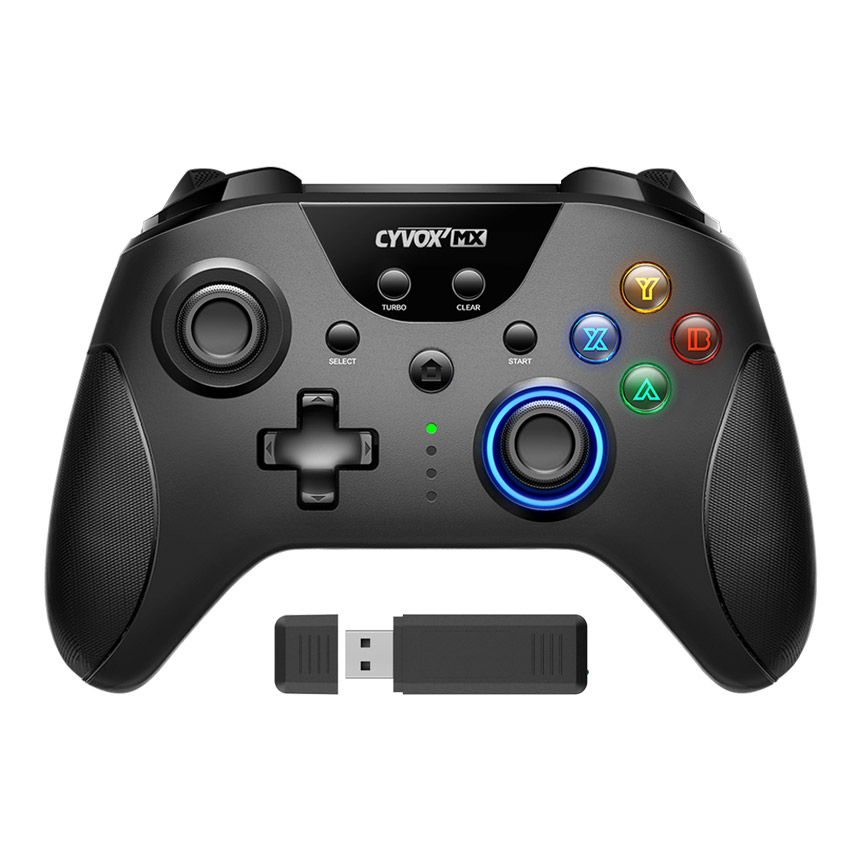 JoytronJoytron Cyvox MX Wireless
Wireless connectivity with 4 rear buttons
View product ↓ - 02
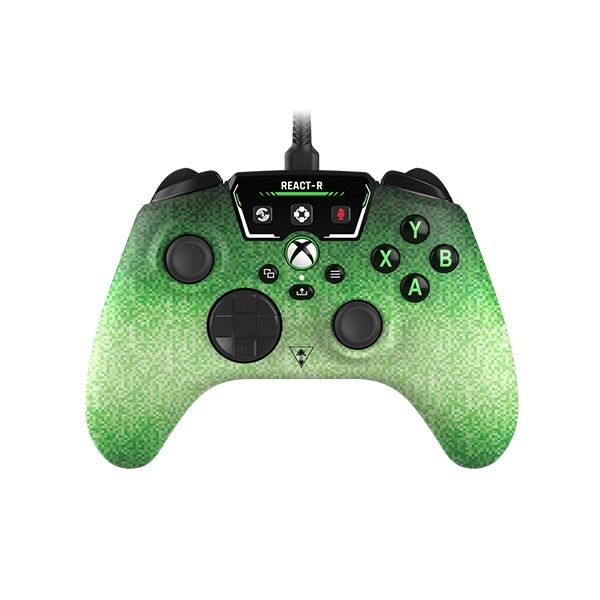 Turtle BeachTurtle Beach REACT-R Pixel
A wired controller for both PC and Xbox
View product ↓ - 03
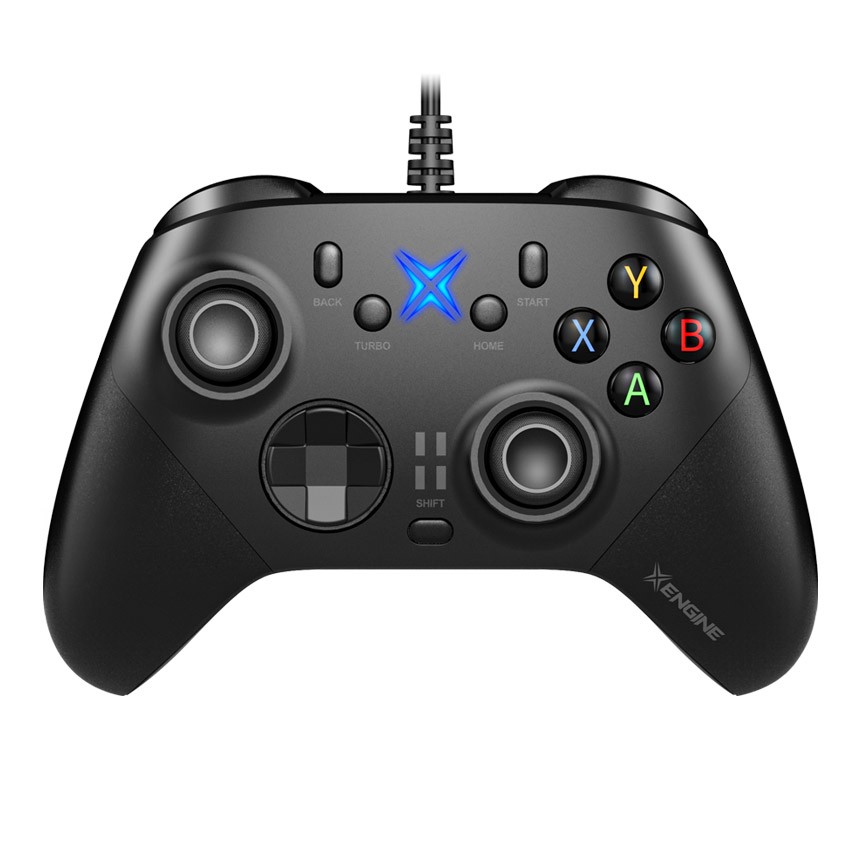 JoytronJoytron XENGINE XENGINE-W
Interchangeable sticks and D-pad to suit your hands
View product ↓ - 04
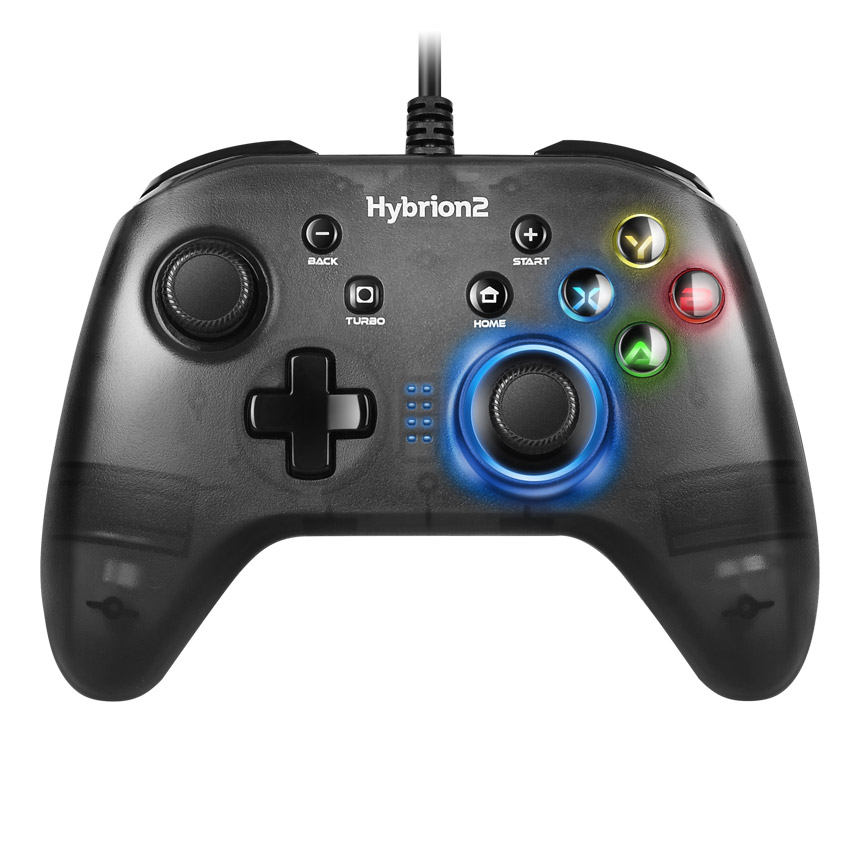 JoytronJoytron Hybrion2 JTPC-125
Start with USB at a lower purchase cost
View product ↓ - 05
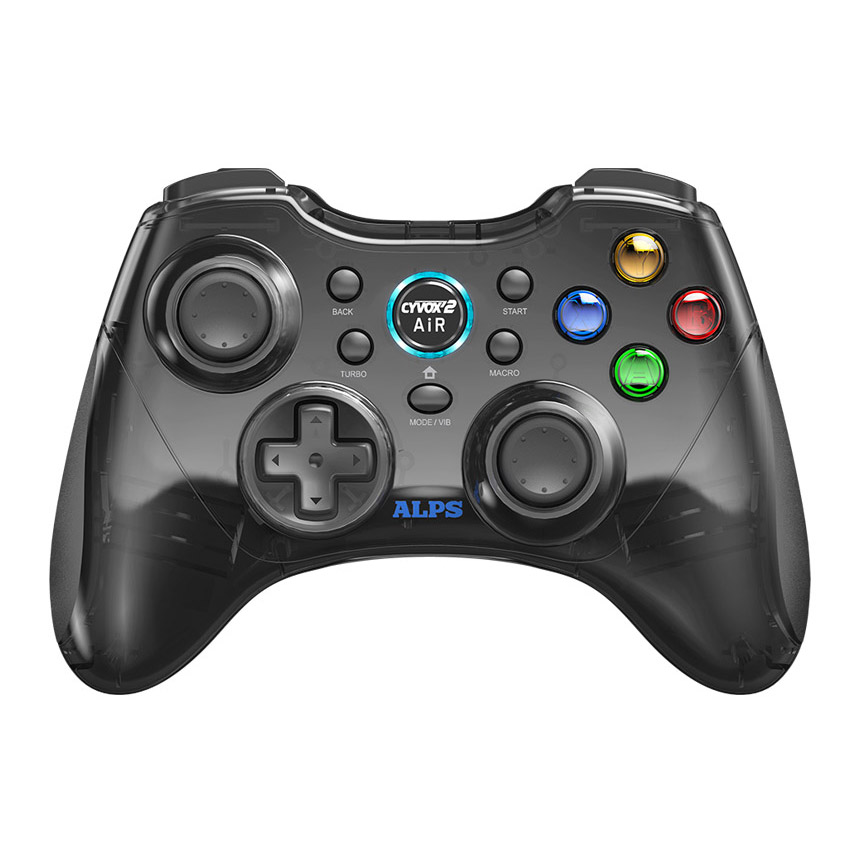 JoytronJoytron CYVOX2 AIR
Asymmetric sticks and wireless connectivity via a receiver
View product ↓
Hall-effect sensors alone are not enough to rank game controllers. Someone who wants to shift positions without a cable needs a different package from someone who wants to adjust stick height at a desk. Comparing wireless connectivity, wired use, and Xbox compatibility with PC gaming as the focus can help avoid paying extra for features you will not use.
Why consider it now
When choosing your first PC controller or replacing a wired controller with a wireless model, it helps to compare both connectivity and controls. Even at similar purchase prices, rear-button counts, interchangeable parts, and Xbox compatibility differ. The focus here is on the package that suits where you play and the devices you use now, rather than whether a model is new.
Why this order
The Cyvox MX Wireless is our first recommendation because it offers both wireless and wired PC connections along with 4 rear buttons. The REACT-R Pixel differs in product price by just KRW 100, but it is wired; it moves up the list if Xbox compatibility matters. The XENGINE offers interchangeable sticks and a D-pad at a higher cost. The Hybrion2 suits buyers prioritizing initial purchase cost, while the CYVOX2 AIR is another option supporting both wired and wireless PC connections.
Joytron
Joytron Cyvox MX Wireless
Our first pick
Wireless connectivity with 4 rear buttons
It is our first recommendation because it lets you change both the connection method and button assignments for PC use. Its product price differs from the REACT-R Pixel by KRW 100, yet it offers wireless use and 4 rear buttons. If you want to use the same controller with an Xbox console, the REACT-R Pixel is a better starting point. If you also want to change stick height, the XENGINE’s interchangeable parts make a more direct difference.
Suitable for people who mainly play PC games and want to use both wireless connectivity and rear-button assignments.
If you like to change position while playing at your PC, the presence of a cable is an early consideration. The Cyvox MX Wireless connects wirelessly through the included receiver plugged into your PC and also supports a wired connection using a USB cable. The controller, receiver, and charging cable are included, so there is no need to assemble a basic PC setup separately.
The controls use Hall-effect analog sticks and Hall-effect triggers. Each rear M1–M4 button can be assigned 1 supported button input, moving frequently used inputs to the back of the grips. This is different from storing a sequence of inputs, however. The manual states that only the last input is assigned, regardless of the order in which buttons are pressed.
PC connectivity without the cable
The included receiver eliminates the need for a cable running from the controller in your hands to the PC. A wired connection is also available to suit your desk and chair arrangement.
Move frequent inputs to the back
Each of the 4 rear buttons can be assigned 1 supported input. This is useful if you want to reduce the need to move a finger to a particular button.
Before you choose
Wireless use requires the included receiver to be connected and the battery to be charged. If you also intend to use an Xbox console, the REACT-R Pixel, with explicitly stated official compatibility, is the more suitable choice.
- PC connection
- Wireless via included receiver / USB wired
- Controls
- Hall-effect sticks · Hall-effect triggers
- Rear buttons
- 4 buttons · one supported input assigned to each
- Standard package
- 1 controller · receiver · charging cable · manual
- Price when checked
- KRW 49,800 · 1 new standard retail unit, with no coupon, membership, or card discounts or reward points deducted; shipping of KRW 3,000 is separate2026-11-01
Turtle Beach
Turtle Beach REACT-R Pixel
Why consider it
A wired controller for both PC and Xbox
Its versatility across PC and Xbox earns it the second recommendation. Its price is similar to the first-ranked Cyvox MX Wireless, but the REACT-R requires a cable connection. If you only play on PC and want wireless use, the Cyvox MX Wireless is more suitable. If Xbox compatibility and a detachable cable take priority, this model can be your first choice.
Suitable for people who use both a Windows 10·11 PC and an Xbox console and prefer a wired connection.
If you use an Xbox console as well as a Windows PC, official device support becomes a key selection criterion. The REACT-R Pixel is a wired controller that supports Xbox Series X|S, Xbox One, and Windows 10·11. Its detachable cable lets you pack the controller and cable separately when moving between devices or putting it away.
The official standard package includes the controller, a 2.5m USB cable, a quick-start guide, and a sticker. The controller end is USB-C, and the device end is USB-A. There are 2 assignable Quick Action buttons on the back. The package prioritizes using 1 controller for both PC and Xbox over wireless connectivity.
1 controller for both devices
It officially supports Xbox Series X|S, Xbox One, and Windows 10·11. This can reduce the need to choose separate controllers for the 2 environments.
A cable that detaches for storage
The included 2.5m USB cable detaches from the controller. You can store it separately rather than wrapping it around the grips.
Before you choose
There is no wireless connection, so the cable must reach your playing position. For wireless PC use, the Cyvox MX Wireless or CYVOX2 AIR is more suitable.
- Supported devices
- Windows 10·11 / Xbox Series X|S / Xbox One
- Connection
- Wired · detachable 2.5m USB cable
- Rear buttons
- 2 assignable Quick Action buttons
- Standard package
- 1 Pixel controller · USB cable · guide · sticker
- Price when checked
- KRW 49,900 · 1 genuine Pixel standard retail unit for the Korean market, with no coupon, membership, or card discounts or reward points deducted; shipping of KRW 2,500 is separate2026-11-01
Joytron
Joytron XENGINE XENGINE-W
Why consider it
Interchangeable sticks and D-pad to suit your hands
It ranks third for the control options offered by the included interchangeable parts. Its product price is KRW 9,900 higher than the REACT-R Pixel, making it suitable when changing stick height and D-pad shape matters more than Xbox compatibility. If Hall-effect sensors alone are what you need, the Cyvox MX Wireless is also an option, so the extra cost is best weighed against whether you plan to use the interchangeable parts. If you will not use them, starting with the first 2 products is more reasonable.
Suitable for people who play PC games at a desk and want to change stick height and D-pad shape themselves.
The XENGINE is worth considering if changing the controls under your fingers matters more than the connection method. This wired controller combines Hall-effect analog sticks with interchangeable sticks and a D-pad. The standard package includes 6mm·8mm sticks and a round D-pad, allowing you to change the height and shape of the controls with the included parts.
The A·B·X·Y buttons use mechanical microswitches, and the rear M1·M2 buttons can be configured with input assignments. These offer a clear reason to choose it if button mechanisms and interchangeable parts matter to you. The official manual instructs users to disconnect the controller from the device before changing the sticks or D-pad and to take care not to damage the D-pad plate.
Choose the parts under your fingers
The included 6mm·8mm sticks and round D-pad let you change the controls. This is useful if you want to compare heights and D-pad shapes rather than adapt your hands to the standard shape.
Wired use without charging
It connects to a PC with an approximately 2m cable. If you play at a fixed distance at your desk, there is no battery level to manage separately.
Before you choose
It uses an approximately 2m cable instead of a wireless connection and has the highest product price among the 5 packages compared. The extra cost makes more sense when you plan to use the interchangeable parts.
- Model
- XENGINE-W wired
- Sticks
- Hall-effect analog sticks · interchangeable
- Main buttons
- A·B·X·Y mechanical microswitches
- Standard package
- Controller · 6mm/8mm sticks, 1 each · round D-pad · manual
- Price when checked
- KRW 59,800 · 1 new standard retail unit, including the supplied interchangeable parts, with no coupon, membership, or card discounts or reward points deducted; shipping of KRW 3,000 is separate2026-11-01
Joytron
Joytron Hybrion2 JTPC-125
Why consider it
Start with USB at a lower purchase cost
It ranks fourth as an option for lowering the initial purchase cost rather than adding wireless connectivity or more control options. Its product price is KRW 7,800 lower than the Cyvox MX Wireless, but it requires a cable running to the PC. If you expect to use wireless connectivity frequently, there is a reason to pay the difference for the Cyvox MX Wireless. Conversely, the Hybrion2 moves up the list if you only need basic controls at your desk.
Suitable for people who play close to their PC with a wired connection and want to reduce the cost of their first controller.
Wireless connectivity and interchangeable parts are not essential from the outset. The Hybrion2 JTPC-125 is a wired game controller that connects to a PC via USB using an approximately 2m cable. The verified price for 1 standard Clear Black unit is KRW 42,000. It has the lowest product price among the 5 retail packages compared.
On PC, it supports X-input and D-input modes. You can switch modes for games that use different controller input standards, and the manual instructs users to connect it directly to a USB port on the PC. To avoid confusing it with the Hybrion2 Air, check both the JTPC-125 model name and the USB wired configuration when purchasing.
A lower product price among these packages
The verified Korean retail package costs KRW 42,000 for 1 controller. It is worth considering if the initial purchase cost matters more than rear buttons or interchangeable parts.
Switch PC input modes
It supports X-input and D-input. You can switch modes according to the input standard required by your game.
Before you choose
You must stay within reach of the approximately 2m cable. If you sit farther away or want to play without a cable, the 2 wireless models are more suitable.
- Model
- JTPC-125 · Clear Black
- Connection
- USB wired · approximately 2m cable
- PC input
- X-input / D-input
- Standard package
- 1 game controller · manual
- Price when checked
- KRW 42,000 · 1 new standard Clear Black retail unit, with no coupon, membership, or card discounts or reward points deducted; shipping of KRW 3,000 is separate2026-11-01
Joytron
Joytron CYVOX2 AIR
Why consider it
Asymmetric sticks and wireless connectivity via a receiver
It ranks fifth as an alternative for wireless PC use, with purchase cost also taken into account. Its product price is KRW 5,000 higher than the Cyvox MX Wireless, so the Cyvox MX Wireless is our first recommendation if wireless PC connectivity alone is your requirement. This order does not indicate superiority in wireless latency or battery life.
Suitable for people familiar with an asymmetric stick layout who want to play wirelessly on PC.
Even wireless controllers differ in where your thumbs rest. The CYVOX2 AIR has an asymmetric layout, with the left stick above the D-pad and the right stick lower down. If you are familiar with this layout, your thumbs’ starting positions can guide your choice.
According to the official connection guide, it supports a 2.4GHz wireless connection on PC through the included USB receiver as well as a USB wired connection. The standard package includes the controller, receiver, and a USB-C charging and data cable. There is no need to buy an additional receiver for wireless use, and PC input can be switched between X-input and D-input modes.
Keep a familiar stick position
The left stick sits above the D-pad, while the right stick sits lower down. If you are used to this layout, you can retain your thumbs’ default positions while switching to wireless connectivity.
Receiver and cable included
A USB wireless receiver for PC and a USB-C charging and data cable are included. You can choose between 2.4GHz wireless and wired connectivity to suit your desk setup.
Before you choose
Wireless use requires the included receiver and charging, and the product price is KRW 5,000 higher than the Cyvox MX Wireless.
- Model
- CYVOX2 AIR
- PC connection
- 2.4GHz wireless via receiver / USB wired
- PC input
- X-input / D-input
- Standard package
- 1 controller · USB receiver · USB-C cable · manual
- Price when checked
- KRW 54,800 · 1 new standard Black retail unit, with no coupon, membership, or card discounts or reward points deducted; shipping of KRW 3,000 is separate2026-11-01
MAKE YOUR CHOICE
Compare at a glance
Wireless via receiver / USB wired
Hall-effect sticks and triggers, 4 rear buttons
Controller · receiver · charging cable
KRW 49,800 / shipping KRW 3,000
USB wired
2 rear buttons, officially licensed for Xbox
Pixel controller · detachable 2.5m USB cable
KRW 49,900 / shipping KRW 2,500
USB wired
Interchangeable sticks and D-pad, 2 rear buttons
Controller · interchangeable sticks · round D-pad
KRW 59,800 / shipping KRW 3,000
USB wired
X-input / D-input modes
Clear Black controller · approximately 2m cable
KRW 42,000 / shipping KRW 3,000
2.4GHz wireless via receiver / USB wired
Asymmetric sticks: left higher, right lower
Controller · USB receiver · USB-C cable
KRW 54,800 / shipping KRW 3,000
Prices reflect the date checked. Check the seller for current prices and purchase conditions.
Selection criteria
This recommendation order considers connection convenience for PC gaming, control customization options, and the cost of the verified Korean retail packages. It is not a sales ranking. Prices are for 1 new controller as shown on retail pages on November 1, 2026; shipping fees and conditional benefits are listed separately.
- Editorial period
- 26/11 Week 1
- Information checked
- 2026-11-01