Digital & electronics26/10 Week 5
Desktop USB Microphones: Differences in Mounting and Controls TOP5 picks
USB microphones may share the same connection type, but their stands and controls change the setup process. We look at mounting costs on top of the price of 1 standard unit, and how each model lets you adjust recording input and headphone sound.
Information checked
The five at a glance
Compare at a glance ↓- 01
 RØDERØDE NT-USB Mini
A compact recording setup built around a magnetic stand
View product ↓ - 02
 SennheiserSennheiser Profile USB Microphone — Arm Stand Not Included
Separate controls for recording input and listening levels
View product ↓ - 03
 Audio-TechnicaAudio-Technica AT2020USB-X
Touch to mute, with color-coded confirmation
View product ↓ - 04
 SHURESHURE MV6
Automatic input adjustment that follows changes in your voice level
View product ↓ - 05
 MACKIEMACKIE EM-USB
A recording setup with a tripod stand and input gain control
View product ↓
Start by deciding whether to place the microphone beside your laptop or bring it close to your mouth on an arm; that helps clarify the setup you need. It is also important to distinguish gain, which raises the recorded signal level, from the volume you hear through headphones. For computer-based voice recording and streaming, we examine how stands, controls, and connection accessories affect the choice.
Why consider it now
Moving from voice input for meetings to narration recording or streaming means preparing for mounting and monitoring as well. Whether you start with a desktop stand or add a separate arm, and whether you adjust input levels manually or leave them to automatic control, changes both the equipment you need and how you work.
Why this order
We recommend the NT-USB Mini first for its included stand and low initial cost. The Profile is a better fit if you frequently adjust input gain and the monitor mix, while the AT2020USB-X can take priority if touch mute and connection adapters matter more. The MV6 is a dynamic alternative with automatic input adjustment and detailed settings managed through the MOTIV Mix app on a compatible PC or Mac. The EM-USB suits those who prefer manual gain controls on the microphone and a tripod stand. This order reflects these use cases, rather than an absolute ranking of sound quality.
RØDE
RØDE NT-USB Mini
Our first pick
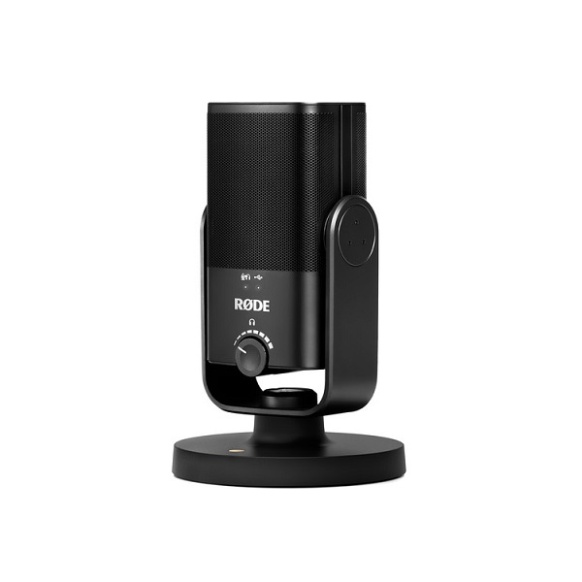
A compact recording setup built around a magnetic stand
It comes first for its KRW 184,000 package with an included stand and straightforward switching between mounting options. At a selling price KRW 27,000 below the Profile, it lets you start desktop recording and direct monitoring. However, if you often need to adjust input gain and the balance of microphone and computer audio separately on the microphone itself, there is a reason to choose the Profile first.
Suitable for people starting meetings and narration recording in a compact workspace who plan to add a microphone arm later.
When you first put a microphone on your desk, arranging a mount can feel more daunting than the cost of the microphone itself. The NT-USB Mini has a detachable magnetic stand and a swivel mount, letting you place it on a desk and adjust its angle. It suits a setup that starts with voice recording beside a laptop, then moves to a separate stand or arm once you need to position the microphone closer to your mouth.
A built-in pop filter and direct headphone monitoring keep the setup simple when checking your articulation and sound level before recording. The included cable has USB-C at the microphone end and USB-A at the computer end. If your computer has only USB-C ports, it makes sense to factor in the cost of a separate connection cable or other necessary accessories.
Easy to change mounting setups
The magnetic stand detaches, and the mount angle can be adjusted. This supports starting on a desk and adding a separate arm later.
Hear your own voice before recording
Direct monitoring is available through the 3.5mm headphone output. It helps you check your speech without the delay of audio passing through the computer and back.
Before you choose
The front knob controls headphone volume. If you want separate knobs for input gain and the monitor mix, the Profile offers a more suitable control layout.
- Type
- Condenser / Unidirectional
- Standard mounting
- Detachable magnetic stand / Swivel mount
- Connection
- USB-C on microphone / Included USB-C–USB-A cable
- Computer compatibility
- PC and Mac supporting class-compliant audio
- Headphones
- 3.5mm output / Direct monitoring
- Price when checked
- KRW 184,000 · 1 standard unit · No conditional discounts applied2026-10-30
Sennheiser
Sennheiser Profile USB Microphone — Arm Stand Not Included
Why consider it
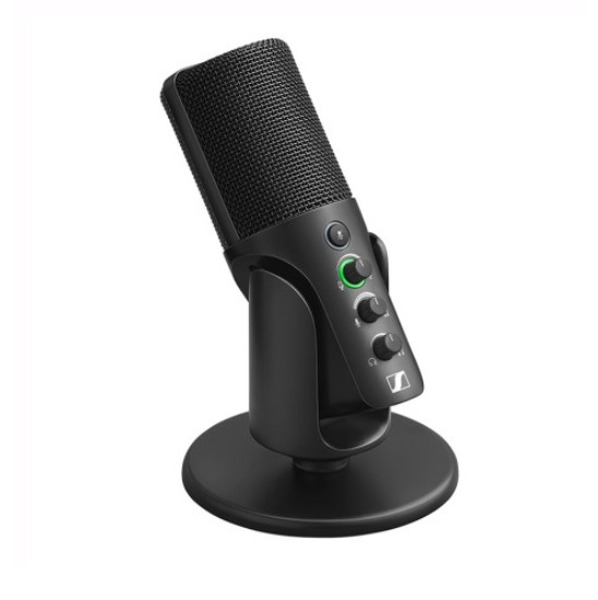
Separate controls for recording input and listening levels
Although it costs more than the NT-USB Mini, it is our second recommendation because it offers separate input gain and monitor mix controls on the microphone. This choice prioritizes hands-on control of recording input over the AT2020USB-X’s touch mute. If touch mute or an included USB-A connection setup matters more, the AT2020USB-X takes priority.
Suitable for people using wired headphones connected to the microphone who frequently adjust input gain and the monitor mix.
A quiet recorded voice and a voice that sounds quiet through headphones are different problems. The Profile lets you separately adjust microphone input gain, the monitor mix of microphone and computer audio, and headphone volume. It is useful for users who want to set input and listening levels by hand instead of switching windows in recording software.
The KRW 211,000 product is the standard version without an arm stand. The manufacturer’s standard set includes a desktop stand and a USB-C cable, unlike the Streaming Set, which includes a boom arm. Check your computer’s USB-C connectivity first, and if you want the microphone suspended close to your mouth, factor in the cost of a separate arm.
Connection compatibility also deserves attention. An Igor’sLAB review dated October 20, 2026 reported that an MSI MEG X870E GODLIKE system stalled during boot with the Profile connected. This was an observation in that test configuration and does not mean it occurs on every PC.
Separate input and listening levels
Gain and headphone volume have separate controls. This layout can reduce the confusion of changing recording input when you only meant to turn up the sound you hear.
Balance microphone and computer audio
The mix control changes the balance of the 2 audio sources heard through headphones. It suits recording speech while listening to playback from a computer.
Before you choose
A boom arm and accessories for USB-A connectivity need to be obtained separately. Igor’sLAB reported a boot problem in its MSI MEG X870E GODLIKE test, so users of that system should pay particular attention to connection compatibility.
- Type
- Condenser / Unidirectional
- Standard package
- Microphone · Desktop stand · USB-C cable / Boom arm excluded
- On-microphone controls
- Mute · Input gain · Monitor mix · Headphone volume
- Computer compatibility
- Windows 10 or later / macOS 10.15 or later
- Headphones
- 3.5mm output
- Compatibility test note
- Igor’sLAB: MSI MEG X870E GODLIKE boot issue reported / Cannot be generalized to all PCs
- Price when checked
- KRW 211,000 · 1 standard unit without arm stand · No conditional discounts applied2026-10-30
Audio-Technica
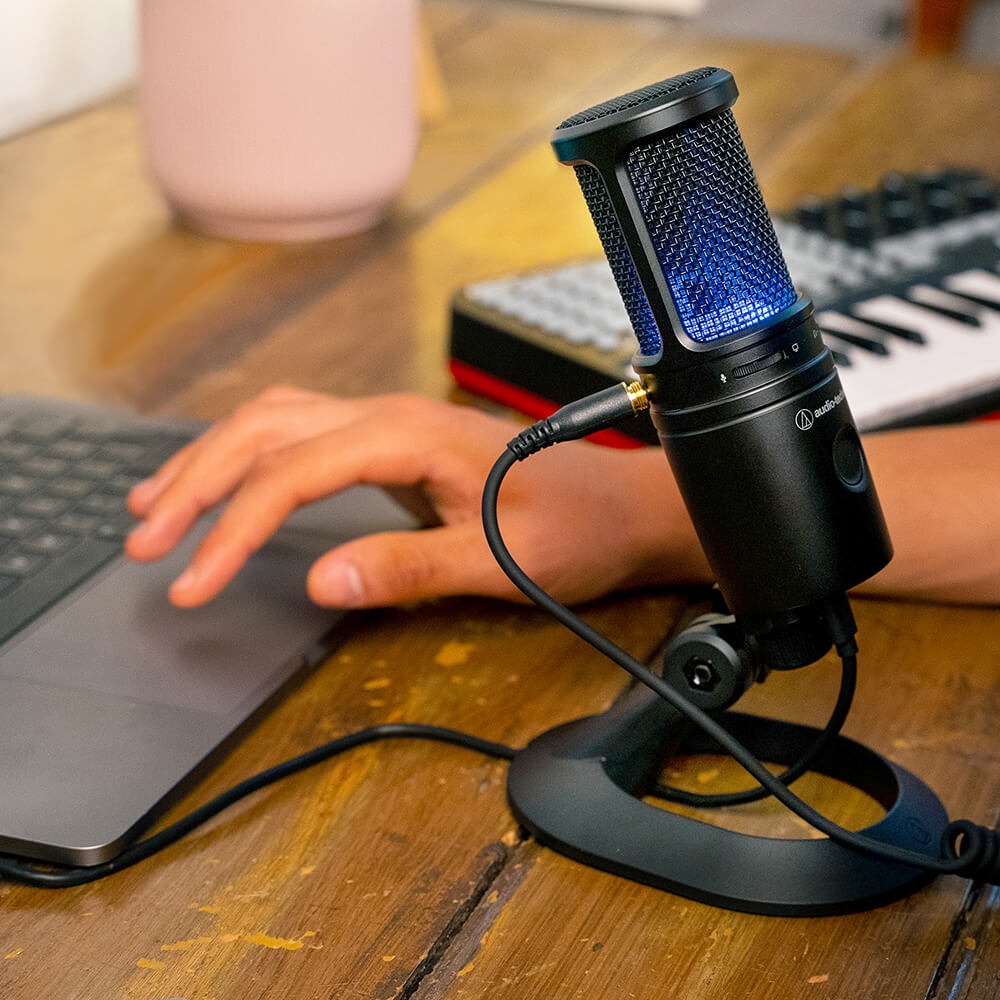
Audio-Technica AT2020USB-X
Why consider it
Touch to mute, with color-coded confirmation
At a selling price KRW 12,000 higher than the Profile, this option adds touch mute, status indication, and connection adapters. It follows the Profile in our default order, which prioritizes input gain control, but the order can be reversed if you frequently toggle mute during broadcasts. Offering a monitor mix at a verified selling price below the EM-USB is another reason to choose it.
Suitable for people who frequently toggle mute during video calls or streaming and want to hear microphone and computer audio together.
When briefly muting a microphone during a conversation, being able to recognize its status immediately matters. The AT2020USB-X toggles mute with a capacitive touch sensor, with a blue light when picking up sound and a red light when muted. You can change its status without pressing a button down firmly.
It also offers direct headphone monitoring and a mix control for microphone audio and PC playback. The package includes a standard stand, a USB-C–USB-A cable, and a USB-A–USB-C adapter, making it easier to prepare a connection for your computer’s ports. However, the manufacturer notes that it may not work properly with some Windows PCs, citing examples such as PCs with 11th-generation or later Intel Core processors, and advises checking its support documentation.
Visible mute status
Blue and red distinguish active pickup from mute. This is useful for checking the status before speaking, and the touch sensor switches between them.
Connection and monitoring in the same package
A USB-A connection cable and USB-C adapter are included as standard. With headphones connected to the microphone, you can adjust the balance between direct monitoring and PC audio.
Before you choose
The manufacturer notes operating issues with some Windows PCs, so its relevant support documentation needs to be checked. If a separate knob for input gain is the priority, the Profile is more convenient.
- Type
- Condenser / Unidirectional
- Standard package
- Desktop stand · Thread adapter · USB-C–USB-A cable · USB-C adapter
- Mute
- Touch sensor / Blue for active pickup · Red for mute
- Monitoring
- Direct headphone monitoring / Microphone–PC mix
- Compatibility caution
- Check manufacturer support documentation for operating cautions affecting some Windows PCs
- Price when checked
- KRW 223,000 · 1 standard unit · No conditional discounts applied2026-10-30
SHURE
SHURE MV6
Why consider it
Automatic input adjustment that follows changes in your voice level
It ranks fourth as a dynamic option combining a desktop stand and automatic input adjustment for KRW 266,000. It costs KRW 16,000 more than the EM-USB but prioritizes automatic input adjustment, with detailed settings handled in the free MOTIV Mix app on a compatible PC or Mac. The EM-USB is more suitable if you want to set input levels manually and use a tripod stand; the Profile or AT2020USB-X takes priority if changing the microphone–PC audio balance directly on the microphone matters more.
Suitable for people recording gaming broadcasts or conversations with frequent changes in voice volume who want to manage detailed settings in MOTIV Mix on a compatible PC or Mac.
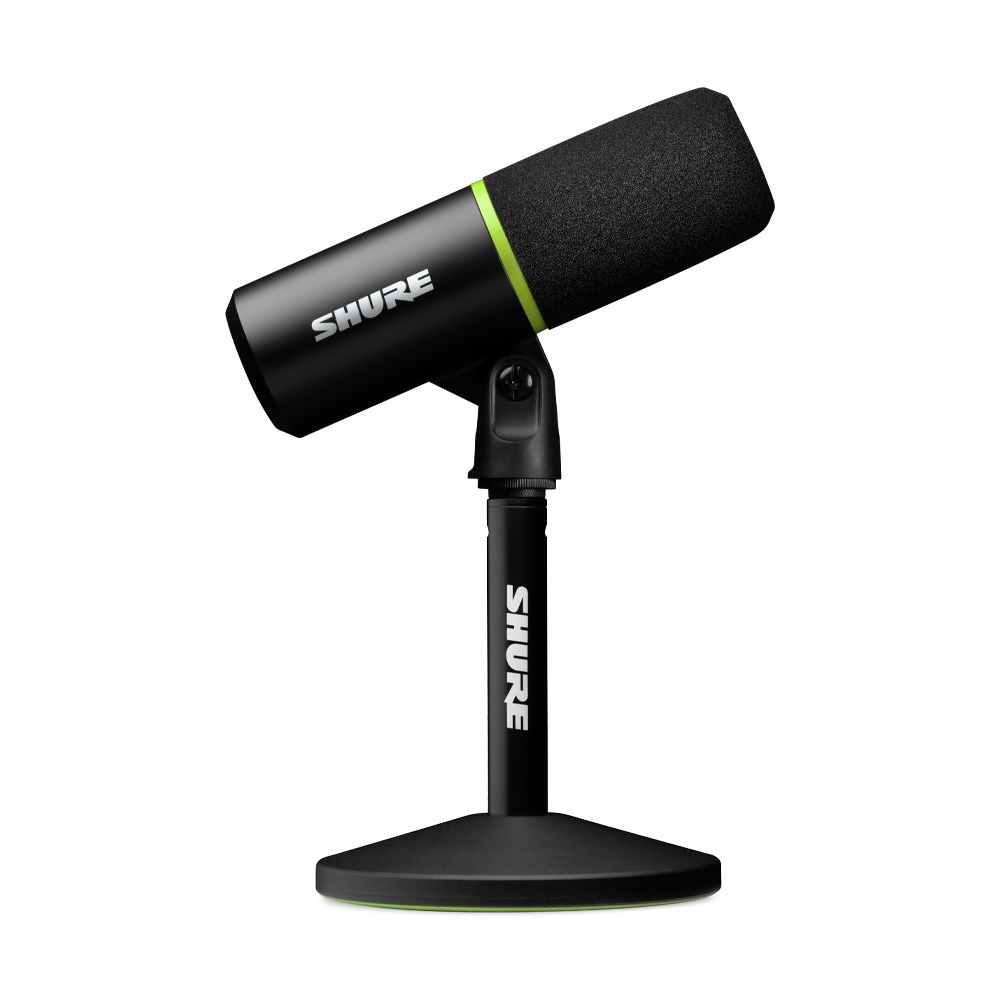
Moving while recording or speaking louder changes the level of the signal entering the microphone. The MV6’s Auto Level Mode automatically adjusts input gain according to the distance between your mouth and the microphone and the volume of your speech. It suits situations where you are focused on a game or conversation and cannot keep adjusting input levels by hand. Detailed sound settings are adjusted in the free MOTIV Mix app on a compatible PC or Mac.
Touch mute and a 3.5mm headphone output let you briefly cut your voice or immediately hear the voice being recorded. Using the included desktop stand means you do not have to start by buying separate equipment to hold the microphone upright. Preparing a USB-C connection on your computer and deciding whether to use automatic speech adjustment or manage detailed settings in MOTIV Mix makes it easier to put together your recording setup.
Input level that adapts to your speech
Auto Level Mode adjusts input gain according to distance and voice volume. With detailed settings handled in the free MOTIV Mix app on a compatible PC or Mac, the setup focuses on reducing the need to keep adjusting a knob while speaking.
A stand and headphone output in the same setup
It has a desktop stand and a 3.5mm headphone output. You can place it upright on your desk and check your own voice through wired headphones.
Before you choose
Detailed sound settings use the MOTIV Mix app on a compatible PC or Mac. If you want to adjust input level and monitor mix separately with knobs on the microphone without opening an app window, the Profile offers a more direct layout.
- Type
- Dynamic
- Connection
- USB-C / PC and Mac connection
- Standard mounting
- Desktop stand included
- Input adjustment
- Auto Level Mode / Detailed settings in the free MOTIV Mix app on a compatible PC or Mac
- Mute and headphones
- Touch mute / 3.5mm real-time monitoring
- Price when checked
- KRW 266,000 · 1 standard unit · No conditional discounts applied2026-10-30
MACKIE
MACKIE EM-USB
Why consider it
A recording setup with a tripod stand and input gain control
It ranks fifth as an alternative for manually adjusting gain and headphone volume on the microphone while using a tripod stand. It costs KRW 39,000 more than the Profile, so we recommend the Profile first if you need a separate monitor mix control. If you prioritize manual operation and a cost KRW 16,000 below the MV6, the EM-USB can move ahead.
Suitable for people who prefer on-microphone gain control and a tripod stand and are looking for a condenser microphone that connects directly to a computer.
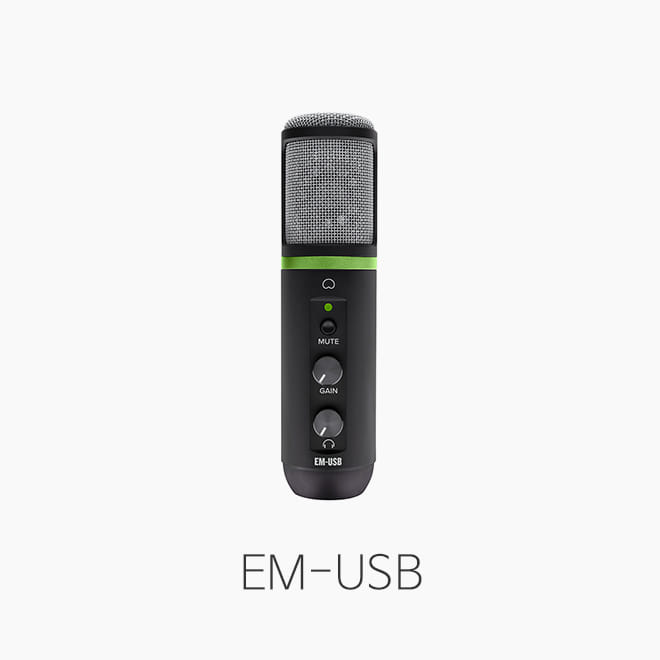
The EM-USB is a condenser microphone that connects directly to a computer, with input gain and headphone volume controls on the microphone. Computer output audio remains audible even when mute is on. This is useful when you want to briefly cut your own speech during a conversation without missing the other person or audio playback.
The manufacturer lists a tripod stand, microphone clip, and USB-C cable as standard accessories. Because you unfold the stand to set it up, its desk placement differs from the NT-USB Mini with its magnetic stand. The Sound Power listing checked here is for 1 standard EM-USB unit, distinct from the EM-91CU or packages bundled with speakers and headphones.
Input control on the microphone
You can adjust microphone input gain on the microphone itself and cut your speech with the mute button. Computer output audio continues while muted, making it easy to follow the conversation and rejoin.
Included tripod stand
A tripod stand is included and uses a microphone clip. It supports placing the microphone upright on a desk without attaching a separate arm.
Before you choose
For the same basis of 1 standard unit, it costs KRW 39,000 more than the Profile. If a dedicated mix control for microphone and PC audio matters, consider the Profile or AT2020USB-X first.
- Type
- Condenser / Unidirectional
- Standard package
- Tripod stand · Microphone clip · USB-C cable
- Connection
- USB-C on microphone / Direct computer connection
- On-microphone controls
- Input gain · Mute · Headphone volume
- Price when checked
- KRW 250,000 · 1 standard unit · No conditional discounts applied2026-10-30
MAKE YOUR CHOICE
Compare at a glance
KRW 184,000 · 1 standard unit
Detachable magnetic stand
Headphone volume · Direct monitoring
Condenser
KRW 211,000 · 1 unit without arm
Desktop stand / Boom arm sold separately
Gain · Mix · Mute · Headphone volume
Condenser
KRW 223,000 · 1 standard unit
Dedicated desktop stand
Touch mute · Mix · Headphone volume
Condenser
KRW 266,000 · 1 standard unit
Desktop stand
Automatic input adjustment · Touch mute / Detailed settings in MOTIV Mix on a compatible PC or Mac
Dynamic
KRW 250,000 · 1 standard unit
Tripod stand / Microphone clip
Gain · Mute · Headphone volume
Condenser
Prices reflect the date checked. Check the seller for current prices and purchase conditions.
Selection criteria
This comparison uses 1 standard unit of each USB microphone sold in Korea for computer-based voice recording and streaming. The order reflects recommendations based on initial mounting costs and ease of operation, rather than sales rankings. Prices are those displayed by retailers on October 30, 2026, without deductions for coupons, membership or card benefits, or reward points.
- Editorial period
- 26/10 Week 5
- Information checked
- 2026-10-30